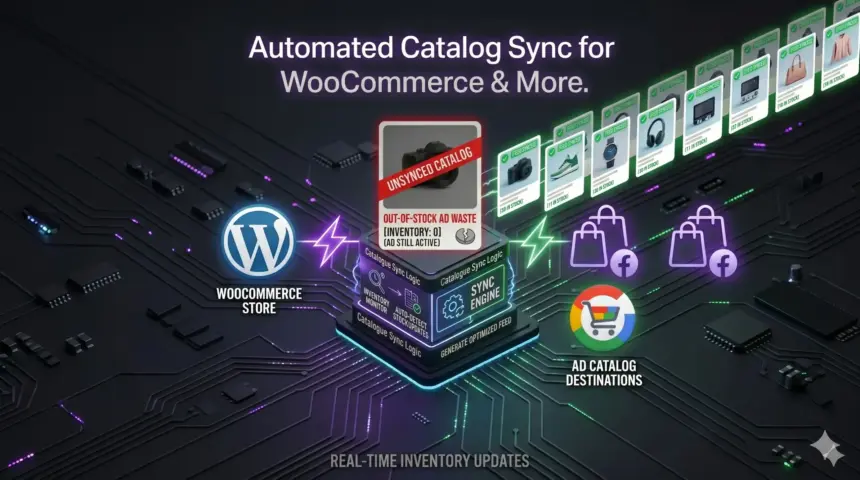
If you manage paid traffic campaigns on Meta, Google, or TikTok, you already know that manual spreadsheet uploads are a relic of the past. To scale modern dynamic product ads or performance max campaigns, your product catalog must be completely automated, syncing inventory and pricing changes in real time.
However, if you look at the current landscape of tutorial guides, they all treat feed generation as an isolated task. They recommend installing a single-purpose catalog plugin to push data to Google Merchant Center or Meta Commerce Manager, and they leave it at that.
Here is the problem: a shopping feed does not exist in a vacuum. The moment a user clicks an item in your catalog, they enter your conversion funnel. If your tracking infrastructure is disconnected from your feed generation, your attribution breaks, your Conversion API (CAPI) match rates tank, and your ad spend goes down the drain.
To run a truly efficient campaign, you don’t just need an automated feed; you need an integrated performance marketing stack. Let’s look at why traditional setups fail and how a unified, host-native approach solves both your catalog and tracking needs.
Table of Contents
- The Hidden Problem with Standard Feed Plugins
- 1. The “Infrastructure Tax”
- 2. The Conversion Disconnect
- 3. Setup Fatigue
- Enter the ROAS Toolkit: Unified Feeds & Server-Native Tracking
- How to Automatically Generate Your Shopping Feeds (Step-by-Step)
- Step 1: Install and Connect
- Step 2: Automated Catalog Mapping
- Step 3: Setting the Host-Native Sync Schedule
- The Arbitrage Advantage: Specialized Content Feeds
- Securing the Click: Automated UTM Persistence
- Conclusion: Stop Renting Your Data Infrastructure
- Why Performance Marketers Are Making the Switch:
The Hidden Problem with Standard Feed Plugins
Most businesses rely on a fragmented stack of single-purpose tools. For example, a typical WordPress site might use one plugin for generating Google XML feeds, another plugin like PixelYourSite for browser tracking, and a third-party managed service like Stape.io or Google Cloud Platform (GCP) to handle server-side Google Tag Manager (sGTM) for Meta CAPI.
While this fragmented approach works under low traffic volumes, it introduces severe operational bottlenecks when campaigns scale:
1. The “Infrastructure Tax”
Every single event triggered by a user clicking through your shopping feed—pageviews, add-to-carts, scroll depths, and checkouts—creates an HTTP request. When you route these requests through an external cloud middleman (like sGTM via Stape or GCP), your hosting fees scale linearly with your traffic. High-volume campaigns can easily rack up an extra $50 to $150+ per month, per domain, in third-party server costs just to handle data you already own. Learn how to enable Meta Capi Without gtm or Cloud.
2. The Conversion Disconnect
Standard feed tools focus entirely on mapping required fields like GTIN, MPN, or product descriptions. They completely ignore what happens after the click. If your tracking architecture isn’t tightly aligned with your product IDs, the data sent back via Meta CAPI won’t cleanly match the product catalog data, destroying your dynamic retargeting optimization.
3. Setup Fatigue
For media buyers rapidly testing new landing pages, angles, or subdomains, configuring separate feed rules, setting up new sGTM containers, and verifying custom tracking subdomains for every single test kills speed and scaling momentum.
Enter the ROAS Toolkit: Unified Feeds & Server-Native Tracking
The ROAS Toolkit shifts the framework from a fragmented tracking stack to a unified, host-native architecture. Instead of treating catalog sync and server-side tracking as separate problems solved by multiple paid plugins and cloud subscriptions, it unifies them directly within your WordPress environment.
[Traditional Setup]: WordPress -> Catalog Plugin -> GTM Server (Stape/GCP) -> Meta Graph API ($$$ Traffic Tax)
[ROAS Toolkit]:      WordPress -> Direct Host-to-Graph-API Link (Zero Extra Server Tax)
By processing both data feeds and tracking signals directly on your WordPress server, the toolkit eliminates the middleman entirely. It routes conversion data directly to ad network Graph APIs, removing recurring third-party data collection fees. Whether your site processes a few hundred visits or millions of pageviews, your infrastructure overhead remains completely flat.
How to Automatically Generate Your Shopping Feeds (Step-by-Step)
Automating your product catalog with a host-native system bypasses complex DNS configuration or external server tagging setup.
Step 1: Install and Connect
Rather than creating separate web and server containers inside Google Tag Manager, you activate the toolkit directly within your WordPress dashboard. You input your Meta Pixel ID, System User Access Token, and Google Analytics measurement IDs to establish a secure, authenticated bridge directly to the ad networks.
Step 2: Automated Catalog Mapping
The toolkit automatically maps your internal WordPress and WooCommerce database fields to the exact specifications required by Google Merchant Center and Meta Catalogs. It standardizes key attributes—including pricing, SKU logic, stock availability, and product imagery—ensuring compliance with ad network schemas without requiring manual spreadsheet formulas.
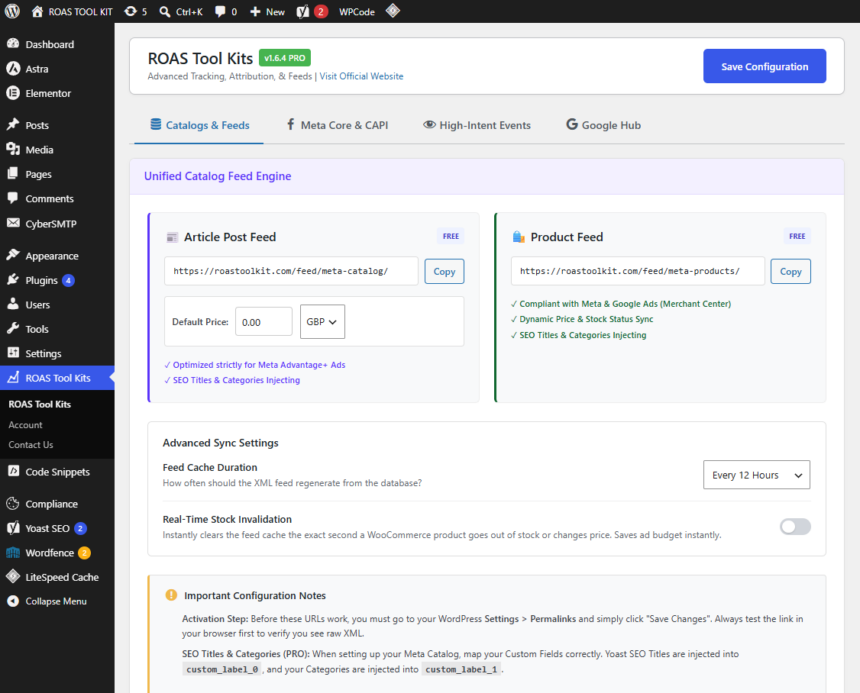
Step 3: Setting the Host-Native Sync Schedule
Instead of waiting for an external cloud server to scrape your site, the toolkit uses your host’s native scheduling to generate updated XML or JSON feeds automatically. When inventory changes or prices drop, the feed reflects it immediately, keeping your live ads synchronized and avoiding account suspensions for mismatched data.
The Arbitrage Advantage: Specialized Content Feeds
If you are a digital publisher, media buyer, or running traffic arbitrage campaigns, standard product catalogs don’t fit your business model. You aren’t selling a physical shoe or a software subscription; your product is your content.
- The Content-Led Optimization Problem: Standard e-commerce feed plugins only understand product attributes like inventory, sizes, and SKUs. They cannot help you optimize a campaign built around a 2,000-word financial guide or an educational advertorial. If you can’t feed content consumption data back to the ad networks, the algorithm cannot optimize for high-intent readers.
- The ROAS Toolkit Solution: The toolkit bridges this gap by offering specialized Content Feeds. This allows digital publishers to sync their high-performing articles, educational guides, and viral content pieces directly to Meta and TikTok as data catalogs.
- Algorithmic Training: By combining content feeds with server-side engagement tracking, you can feed deep data—such as 30-second or 60-second time-on-site milestones—back to the ad networks. Instead of optimizing blindly for cheap clicks, you train the Meta and TikTok algorithms to actively hunt for high-retention readers who consume your ad-monetized content, drastically increasing your content margins and overall profitability.
Securing the Click: Automated UTM Persistence
Generating a flawless automated feed is only half the battle. The true vulnerability in performance marketing occurs after the user clicks your ad and lands on your site.
In a perfect scenario, a user clicks your item in a Meta catalog, browses your multi-step funnel, and converts. But in reality, tracking parameters drop off constantly. If a visitor moves from an initial landing page to a sub-domain, or clicks through an internal link to an external affiliate offer, critical tracking parameters like fbclid, gclid, or custom UTM strings are stripped away by standard browser behavior.
When that conversion finally happens, your server-side CAPI pipeline fires, but it lacks the historical parameter data. As a result, your ad network match quality drops, and the conversion cannot be attributed back to the winning creative.
The ROAS Toolkit eliminates this issue through its native UTM and Click ID Persistence Engine. The plugin locks tracking parameters to the user session, automatically passing them through:
- Internal pages and multi-step layout transitions.
- Cross-domain funnels and tracking subdomains.
- Outbound external affiliate or lead networks.
This guarantees that when the native, server-side CAPI event fires, it passes the complete user journey history directly to Meta or Google. Combined with automatic backend event_id deduplication, you achieve near-perfect data matching without relying on complex, external JavaScript workarounds.
Conclusion: Stop Renting Your Data Infrastructure
Automating your Meta and Google Shopping feeds shouldn’t require you to compromise your tracking or pay a monthly premium to cloud server providers. Fragmented setups that rely on three different plugins and an external sGTM container create unnecessary technical vulnerabilities and drain your marketing margins.
By switching to a host-native architecture with the ROAS Toolkit, you unify your data catalogs and your attribution tracking under one dashboard.
Why Performance Marketers Are Making the Switch:
- Predictable Economics: Eradicate the monthly “cloud infrastructure tax” with clear, flat-rate pricing—including a $99 lifetime option that stops recurring fees for good.
- True Automation: Automatically sync standard WooCommerce product catalogs and specialized content feeds on your server’s native timeline.
- Ironclad Attribution: Keep your UTMs and Click IDs intact across your entire funnel to maximize CAPI match rates.
Stop paying rent to middleman servers just to process your own conversion data. Upgrade your WordPress infrastructure, automate your feeds, and protect your ROAS.